# Integrate AliDropship
## Overview
AliDropship is a connector built over WooCommerce, that provides a payment module which integrates with our Inline Checkout ordering engine, and supports Credit Card and PayPal payments. The plugin can be used for WooCommerce-based websites as well.
## Availability
AliDropship integration is available only for 2Checkout accounts that handle their own tax and invoice management (2Sell and 2Subscribe accounts).
## AliDropship (WooCommerce) Settings
1. Download the plugin from [Wordpress](https://wordpress.org/plugins/yd-2checkout-gateway-for-woocommerce) and upload it to the **/wp-content/plugins/** folder on your web-server.
2. Or, in the admin interface of the Wordpress platform, navigate to the **Plugins** section and search for “YD Gateway 2Checkout for WooCommerce” and click **Install Now.**
3. Activate the extension from the **Plugins** menu in the WordPress platform
4. The option “2Checkout in popup with Credit Card/PayPal” will then be available in WooCommerce. To enable it, navigate to the *Payments tab → Settings.*
5. Click **Manage** to start editing the 2Checkout payment method.
6. Enter the payment method name and description.
7. Activate the **Demo mode** to be able to place test orders.
8. Copy the Merchant code and the Secret Word from your 2checkout Merchant Control Panel. To obtain the Secret Word, navigate to *Dashboard → Integrations → Webhooks & API → Secret Word → INS Secret word*. Your **INS secret word** should be the same as the **buy-link secret word** (can be found under *Dashboard → Integrations → Webhooks & API,* scroll down to the **Secret Word** area, under the INS Secret Word). Edit your INS secret word and buy-link secret word to match each other, then copy and paste them into your AliDropship admin.\
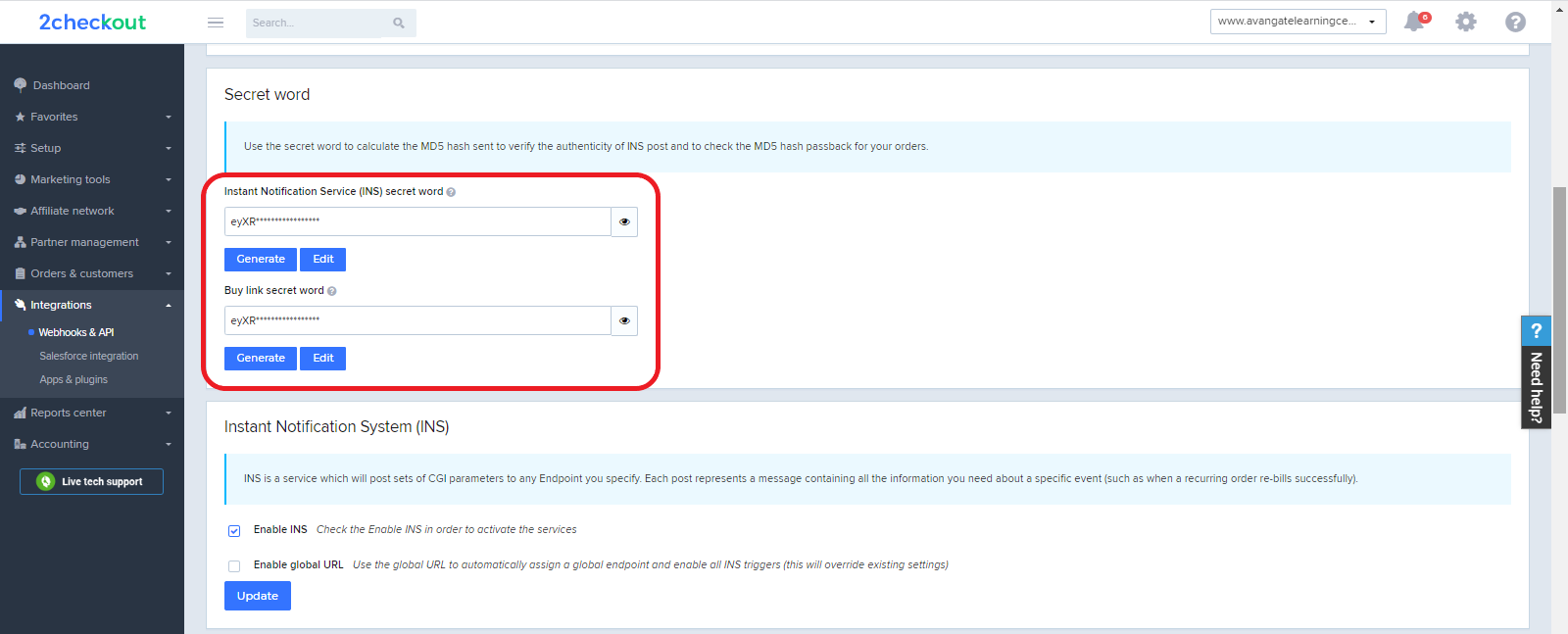
9. Paste both the Merchant code and the Secret Word in the interface from where you are managing the “2Checkout in popup with Credit Card/PayPal” plugin.
### 2Checkout Settings
1. Go to the WooCommerce admin area and navigate to *Payments tab → Settings.*
2. Find the “2Checkout in popup with Credit Card/PayPal” plugin and click **Manage**.
3. Find IPN URL field and copy its content.
4. Sign in to your [2Checkout account](https://secure.2checkout.com/cpanel).
5. Navigate to *Dashboard → Integrations → Webhooks & API* and select the **IPN settings** tab.
6. Click on **Add IPN URL** and paste the content copied from WooCommerce.
7. Enable the **Allow concurrent requests (faster notifications)** checkbox.
8. Close the pop-up by clicking **Add IPN**.
9. For more information visit: [AliDropship documentation](https://help.alidropship.com/en/articles/3392127-yd-gateway-2checkout-for-woocommerce).
### About AliDropship Plugin
AliDropship plugin is the only WordPress solution for creating fully-fledged web stores ready to bring you high stable profit. The AliDropship plugin gives you everything you need to start your own successful dropshipping business right away. The tool offers a complete set of features that make it easy to start and run a successful dropshipping business. For more details, see the [AliDropship website](https://alidropship.com/plugin/).
---
# Agent Instructions: Querying This Documentation
If you need additional information that is not directly available in this page, you can query the documentation dynamically by asking a question.
Perform an HTTP GET request on the current page URL with the `ask` query parameter:
```
GET https://docs.2checkout.com/connectors/connectors/integrate-alidropship.md?ask=
```
The question should be specific, self-contained, and written in natural language.
The response will contain a direct answer to the question and relevant excerpts and sources from the documentation.
Use this mechanism when the answer is not explicitly present in the current page, you need clarification or additional context, or you want to retrieve related documentation sections.