# Integrate Aliphia
## Availability
Aliphia integration is available only for 2Checkout accounts that handle their own tax and invoice management (2Sell and 2Subscribe accounts).
#### Aliphia Settings:
1. Sign in to your Aliphia Account
2. Click **Settings** -> **System Settings**
3. Click the **Merchant Account** tab
4. Select **2Checkout**
5. Enter your [**2Checkout Merchant Code**](https://secure.2checkout.com/cpanel/account.php)
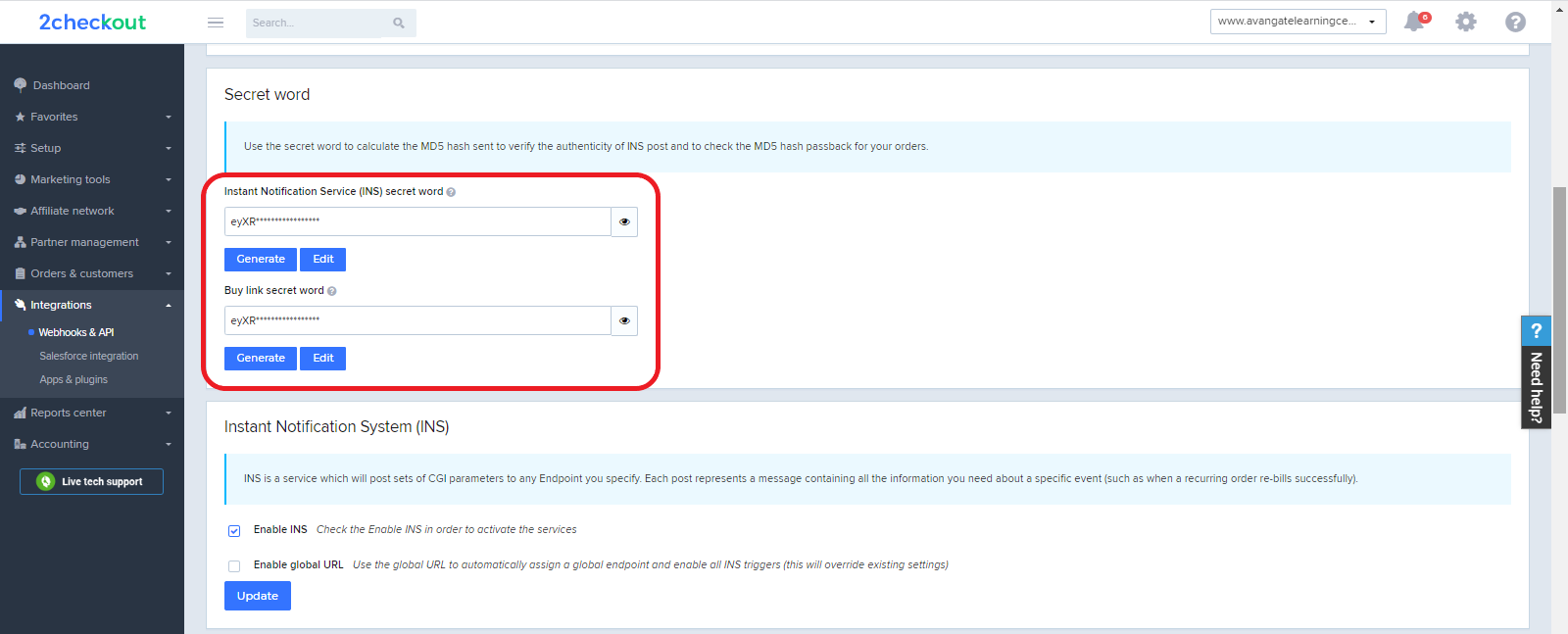
6. Enter your **Secret Word.** To obtain the Secret Word**, c**ontact 2Checkout or, if you already have a 2Checkout account, log in to your Merchant Control Panel and navigate to *Dashboard → Integrations → Webhooks & API → Secret Word → INS Secret word*. Your **INS secret word** should be the same as the **buy-link secret word** (can be found under *Dashboard → Integrations → Webhooks & API*, scroll down to the Secret Word area, under the INS Secret Word). Edit your INS secret word and buy-link secret word to match each other, then copy and paste them into your Aliphia admin.\
7. Click **Save.**
#### 2Checkout Settings:
1. Sign in to your 2Checkout account.
2. Navigate to *Dashboard → Integrations → Webhooks & API*
3. Follow these steps to activate Redirect URL:
* In the **Redirect URL** section check **“Enable return after sale”**
* For Return method, select **Link in the Thank You Page** or **Header redirect**
* Set the **Approved URL** to the URL provided in your Aliphia admin (Replace [http://yourdomain.com](http://yourdomain.com/) with the actual URL to your domain)
4. Click **Update** to **save** your settings.
## About Aliphia
Easy and reliable invoicing software that helps you to run your business with the comfort to access it from anywhere.
For more information, visit [Aliphia](https://aliphia.com/).
---
# Agent Instructions: Querying This Documentation
If you need additional information that is not directly available in this page, you can query the documentation dynamically by asking a question.
Perform an HTTP GET request on the current page URL with the `ask` query parameter:
```
GET https://docs.2checkout.com/connectors/connectors/integrate-aliphia.md?ask=
```
The question should be specific, self-contained, and written in natural language.
The response will contain a direct answer to the question and relevant excerpts and sources from the documentation.
Use this mechanism when the answer is not explicitly present in the current page, you need clarification or additional context, or you want to retrieve related documentation sections.