> For the complete documentation index, see [llms.txt](https://docs.2checkout.com/llms.txt). Markdown versions of documentation pages are available by appending `.md` to page URLs; this page is available as [Markdown](https://docs.2checkout.com/payments/payments/payment-processing/mobile-bank-transfers-in-the-czech-republic.md).
# Mobile bank transfers in the Czech Republic
## Overview
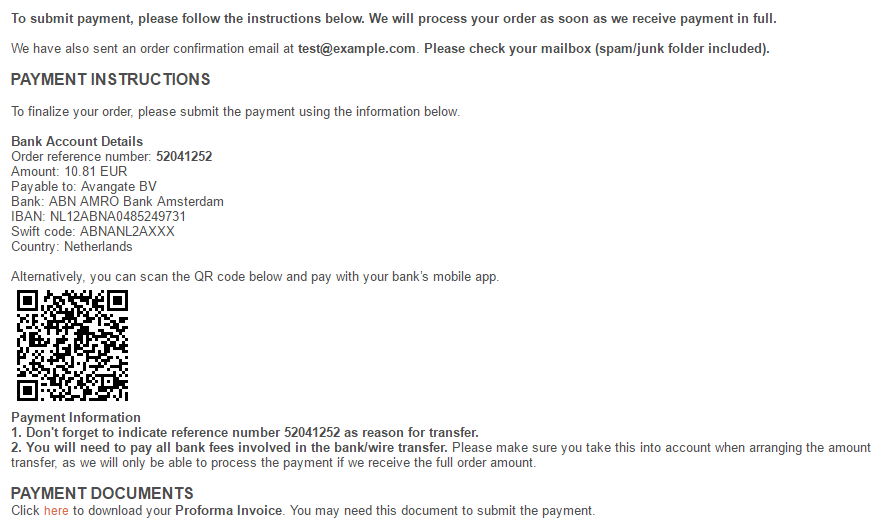
As a faster and easier alternative to classic bank transfers, shoppers based in the Czech Republic can choose to pay for their purchases through their bank's mobile application by scanning a QR code.
Traditional bank transfers are also available, should shoppers prefer not to use mobile banking applications.
QR code payments are available to all Czech shoppers and support CZK (Czech Koruna) transactions through multiple banks, such as:
* Raiffeisen Bank
* mBank
* Air Bank
* ČSOB (Československá obchodní banka)
* Commerzbank
## Availability
Contact 2Checkout for availability details.
## QR code display
2Checkout displays QR codes only on **default purchase flow resources** that you have not customized:
* Default shopping cart
* Default payment confirmation emails
* Default pro forma invoices
If you have customized any of the above resources and you want to include QR codes in your purchase flows, please contact 2Checkout.
## Benefits
By adding QR code payments, we offer a great alternative to classic bank transfers, avoiding the transaction commission shoppers would traditionally need to pay to the bank while minimizing the time to finalize the payment.
Additionally, this brings an increase in your conversion rates of at least 2%.
## Usage
2Checkout displays the QR code during multiple stages of the checkout process, in areas that contain the bank details:
* Thank You page
* Pro forma invoice
* Payment confirmation email
---
# Agent Instructions
This documentation is published with GitBook. GitBook is the documentation platform designed so that both humans and AI agents can read, navigate, and reason over technical content effectively. Learn more at gitbook.com.
## Querying This Documentation
If you need additional information that is not directly available in this page, you can query the documentation by asking a question.
Perform an HTTP GET request on the following URL with the `ask` and `goal` query parameters:
```
GET https://docs.2checkout.com/payments/payments/payment-processing/mobile-bank-transfers-in-the-czech-republic.md?ask=&goal=
```
`ask` is the immediate question: it should be specific, self-contained, and written in natural language.
`goal` is what the user is ultimately trying to achieve, the reason they need the answer. Sharing it helps GitBook give you a better, more relevant answer. A goal is most helpful when it describes the outcome the user wants rather than restating the question. For example, with `ask=how do I create an API token`, a goal like `automate deployments from our CI pipeline` lets GitBook tailor the answer to that use case.
The response will contain a direct answer to the question and relevant excerpts and sources from the documentation.
Use this mechanism when the answer is not explicitly present in the current page, you need clarification or additional context, or you want to retrieve related documentation sections.