> For the complete documentation index, see [llms.txt](https://docs.2checkout.com/llms.txt). Markdown versions of documentation pages are available by appending `.md` to page URLs; this page is available as [Markdown](https://docs.2checkout.com/payments/payments/billing-currencies/bulgarias-currency-transition-to-euro.md).
# Bulgaria’s currency transition to Euro
## Overview
***
Starting January 1, 2026, Bulgaria is officially adopting the Euro (€) as its national currency, replacing the Bulgarian Lev (BGN). This transition is part of Bulgaria’s integration into the Eurozone and aims to simplify financial operations and enhance economic stability.
In the 2Checkout ordering system, prices in BGN for Bulgarian shoppers are displayed in both Lev and Euro until December 31st, 2026.
To enable shoppers to transition to the Euro and to comply with Bulgarian regulations, the following have been implemented across various areas:
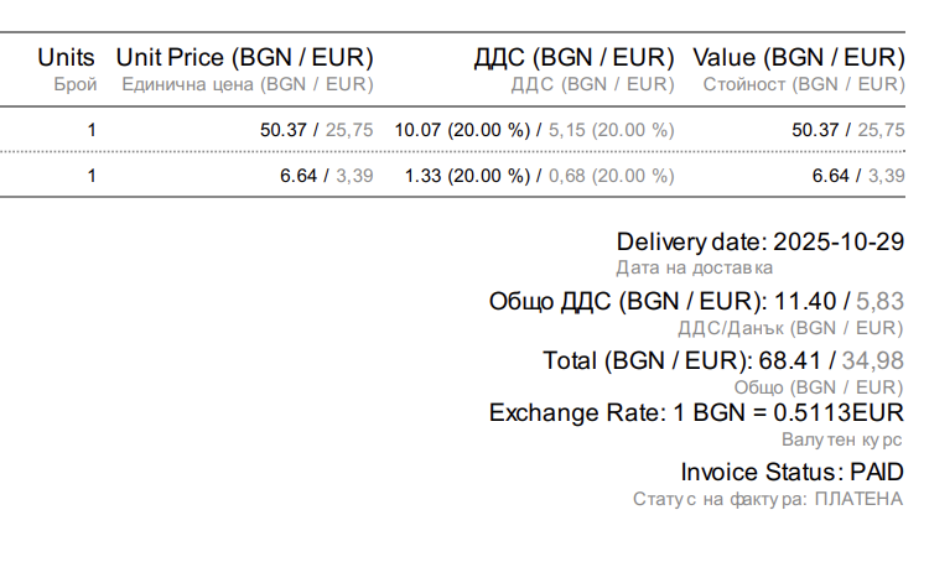
* Dual prices are displayed in both Euro and Lev (shopper invoices, shopping carts, etc.)
* The exchange rate, set by the European Commission, at which the conversion is made, is displayed in various areas (invoices, transactions, carts, etc.)
## Benefits
***
* Merchants stay compliant with European regulations and avoid penalty risks
* Shoppers benefit from transparent transactions and an easily understandable Euro transition
## Impact on customers
***
With Bulgaria’s entry into the Eurozone, the Bulgarian Lev (BGN) is in use for payments until December 31st, 2025. All transactions will be conducted in Euro (EUR) as billing currency starting January 1st, 2026, but both currencies will continue to be displayed.
## 2Checkout system changes
***
* Dual currency display: both BGN and EUR will be used when the billing country is Bulgaria, while Bulgarian Lev continues to be the billing currency until the end of 2025. From January 1st, 2026, even though 2Checkout will display both currencies till the end of 2026, the EUR will be the billing currency.
* Billing, refunds, and reporting will be conducted in EUR starting January 1st, 2026.
* The fixed conversion rate set by the Bulgarian National Bank is 1 EUR = 1.95583 BGN.
### Automatic currency update
If you previously enabled BGN as a billing currency, the platform now displays dual currency when the billing country is Bulgaria. No manual action is required on your part. Your checkout flows, pricing, and reporting tools have been updated accordingly.
### Seamless experience for shoppers
Displaying both currencies helps Bulgarian shoppers get accustomed to the exchange rate. Using the Euro eliminates currency conversion fees and provides greater transparency in pricing.
### What should merchants do?
To ensure a smooth transition, we recommend that merchants:
* Review pricing strategies to align with the new currency.
* Update any custom messaging or marketing materials that reference BGN.
* Monitor reports and analytics to observe any changes in customer behavior or sales trends.
#### Shopper invoices
To comply with Bulgarian legislation, all shopper invoices include dual prices (EUR/BGN). This applies to all prices displayed on the invoice, including the discount area.
## New currency display in shopping carts
***
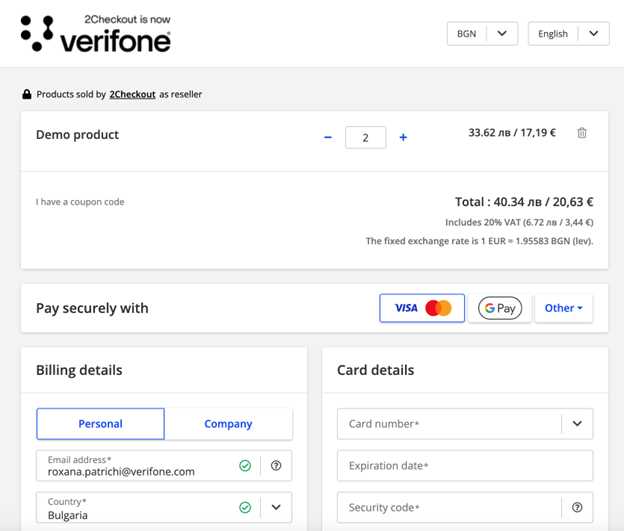
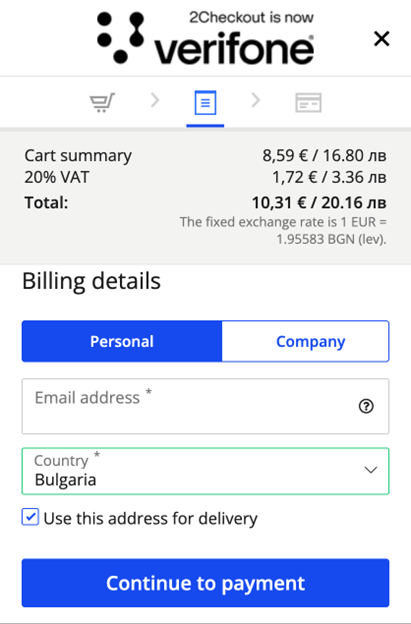
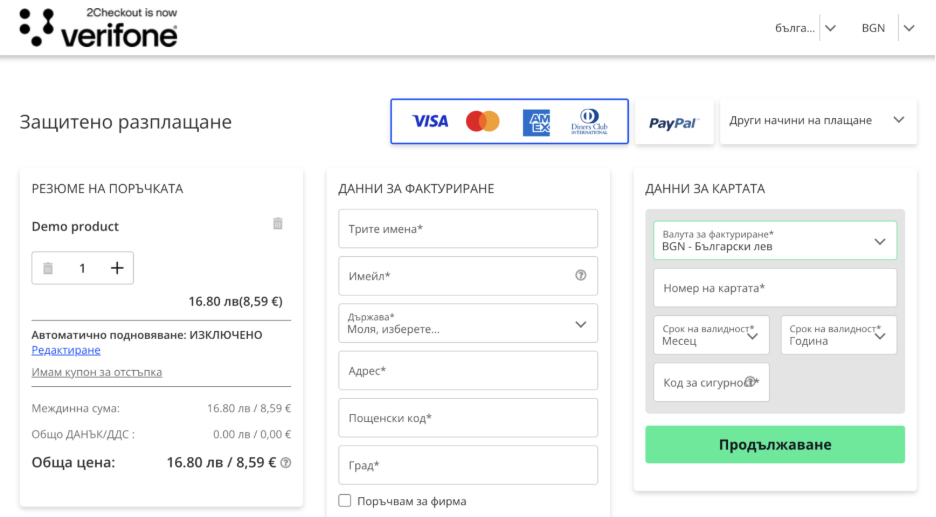
To enable the customer to transition to the Euro throughout 2025, the Convert Plus, Inline Checkout, and Legacy carts will display dual prices (BGN/EUR) whenever the shopper’s billing country is set to Bulgaria.
### ConvertPlus
When landing on Convert Plus checkout with Bulgaria as the billing country and BGN as the billing currency, a dual display of all prices into both BGN/EUR will be displayed to shoppers throughout the entire checkout flow, as well as the following text translated in all cart languages: "The fixed official exchange rate is set at 1.95583 BGN per 1 EUR."
### One Step In-Line Cart
When landing on One-Step InLine with Bulgaria as the billing country and EUR as the billing currency, a dual display of all prices into both BGN/EUR will be displayed to shoppers, as well as the following text translated in all cart languages: " The fixed official exchange rate is set at 1.95583 BGN per 1 EUR."
### Default flows
Starting January 1st, 2026, when landing on the Default flows, shoppers will no longer have the possibility to choose BGN from the billing currency drop-down list. They will also be prompted with a dual display of all prices in both EUR/BGN.
## Impact on subscriptions
***
### Auto-renewal subscriptions
Subscriptions pending for automatic renewal with BGN will be renewed automatically in EUR with no conversion rate applied from January 1st, 2026. The renewal price used is the price in EUR set at the product level.
### Manual renewal subscriptions
From January 1st, 2026, shoppers accessing a manual renewal link will land on a checkout page with billing currency EUR, and dual display currency EUR/BGN (if the billing country is Bulgaria). There will be no option to select BGN as the billing currency. The billing price will be the price in EUR, set at the product level. If there is no set price in EUR, the fixed conversion rate will be applied to the price in BGN to calculate the billing price in EUR.
---
# Agent Instructions
This documentation is published with GitBook. GitBook is the documentation platform designed so that both humans and AI agents can read, navigate, and reason over technical content effectively. Learn more at gitbook.com.
## Querying This Documentation
If you need additional information that is not directly available in this page, you can query the documentation by asking a question.
Perform an HTTP GET request on the following URL with the `ask` and `goal` query parameters:
```
GET https://docs.2checkout.com/payments/payments/billing-currencies/bulgarias-currency-transition-to-euro.md?ask=&goal=
```
`ask` is the immediate question: it should be specific, self-contained, and written in natural language.
`goal` is what the user is ultimately trying to achieve, the reason they need the answer. Sharing it helps GitBook give you a better, more relevant answer. A goal is most helpful when it describes the outcome the user wants rather than restating the question. For example, with `ask=how do I create an API token`, a goal like `automate deployments from our CI pipeline` lets GitBook tailor the answer to that use case.
The response will contain a direct answer to the question and relevant excerpts and sources from the documentation.
Use this mechanism when the answer is not explicitly present in the current page, you need clarification or additional context, or you want to retrieve related documentation sections.