> For the complete documentation index, see [llms.txt](https://docs.2checkout.com/llms.txt). Markdown versions of documentation pages are available by appending `.md` to page URLs; this page is available as [Markdown](https://docs.2checkout.com/subscriptions/subscriptions/subscription-reporting/how-to-collect-churn-reasons.md).

# How to collect churn reasons

## Overview

***

Any effort to understand how [churn](https://docs.2checkout.com/subscriptions/subscriptions/churn-prevention/voluntary-churn-prevention.md) occurs starts with a simple question: where is churn coming from and why? Here are some ways to collect data for voluntary churn, which will later be made available in the churn reports that are currently under construction.

## Collect churn reasons via the Merchant Control Panel

***

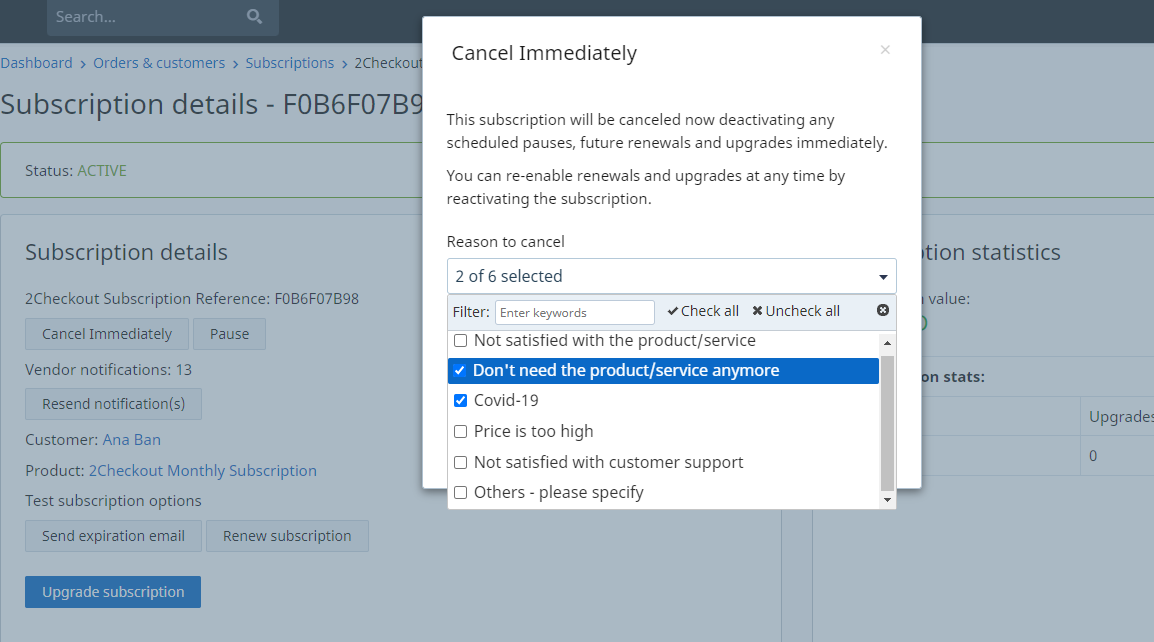
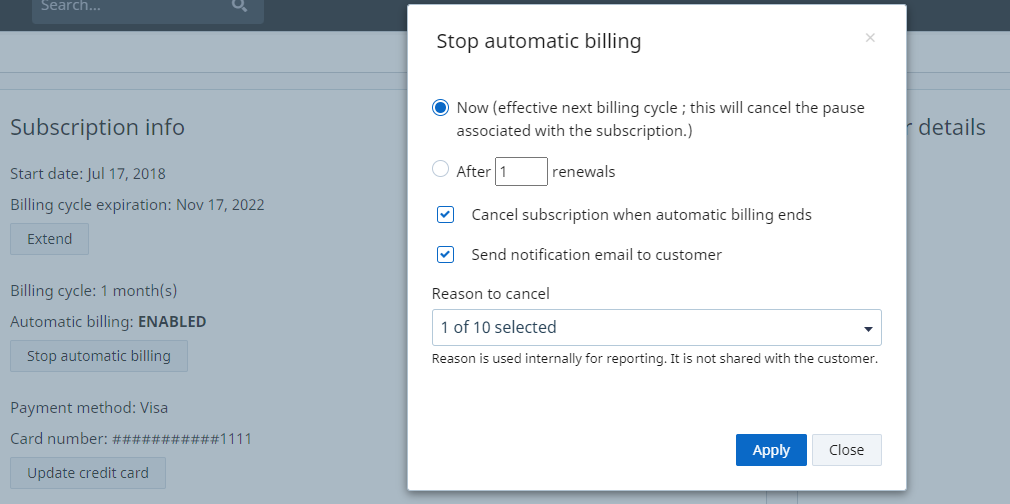
When canceling a subscription or stopping the automatic billing via the subscription page in the Merchant Control Panel, you are presented with the option to select one or multiple churn reasons.

If you choose to cancel the subscription immediately, a confirmation pop-up is displayed, along with the possibility of selecting the cancellation reason:

<div data-with-frame="true"><img src="https://content.gitbook.com/content/dTPb2ipDVVSZO7QfRjJ4/blobs/SjWsJPWHMeLzI43kE6pv/churn%20reasons_1.png" alt=""></div>

Providing the reason for cancellation is not mandatory, however if you want to be able to track churn metrics in the future, this could help you get more comprehensive reporting data.

If you stop the automatic billing, you can either choose to disable it right away or after a number of renewals. However, you can only specify the cancellation reason if you end automatic billing effective immediately.

<div data-with-frame="true"><img src="https://content.gitbook.com/content/dTPb2ipDVVSZO7QfRjJ4/blobs/trJ80kZwSlMFT0RYAiRO/churn%20reasons_2.png" alt=""></div>

### Churn reasons

There are **different churn reasons** available depending on whether the subscription is disabled or the automatic billing is stopped:

<table><thead><tr><th width="370">Churn reason</th><th>Cancel subscription</th><th>Stop automatic billing</th></tr></thead><tbody><tr><td>Not satisfied with the product/service</td><td>Yes</td><td>Yes</td></tr><tr><td>Don’t need the product/service anymore</td><td>Yes</td><td>Yes</td></tr><tr><td>Covid-19</td><td>Yes</td><td>Yes</td></tr><tr><td>Price is too high</td><td>Yes</td><td>Yes</td></tr><tr><td>Not satisfied with customer support</td><td>Yes</td><td>Yes</td></tr><tr><td>Accidentally enabled auto-renewal</td><td>No</td><td>Yes</td></tr><tr><td>Prefer to manually renew my subscription</td><td>No</td><td>Yes</td></tr><tr><td>Already renewed my subscription</td><td>No</td><td>Yes</td></tr><tr><td>Don’t need the product/service anymore</td><td>Yes</td><td>Yes</td></tr><tr><td>Want to pause my subscription</td><td>No</td><td>Yes</td></tr><tr><td>Others - please specify</td><td>Yes</td><td>Yes</td></tr></tbody></table>

## Collect churn reasons via 2Checkout MyAccount

***

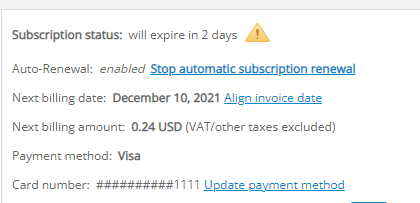
Shoppers can specify the reason they wish to stop the automatic billing if they do it via their 2Checkout MyAccount platform. This applies to both subscriptions that have an active churn prevention campaign and to those that do not, with some workflow differences.

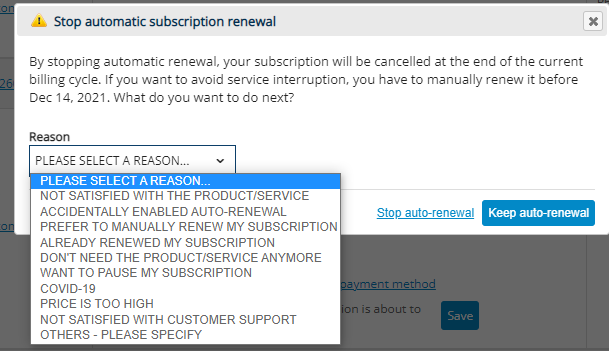
All shoppers that click on the **“Stop automatic subscription renewal”** link (and there is no churn prevention campaign attached to the subscription) get a confirmation pop-up where they can specify the reason for this change.

<div data-with-frame="true"><img src="https://content.gitbook.com/content/dTPb2ipDVVSZO7QfRjJ4/blobs/iD0cZhoyT8Knmkg9kWWm/churn%20reasons_3.png" alt=""></div>

<div data-with-frame="true"><img src="https://content.gitbook.com/content/dTPb2ipDVVSZO7QfRjJ4/blobs/aYpMXYcXd7nZNIVU4pvi/churn%20reasons_4.png" alt=""></div>

If a churn prevention campaign is already attached to the subscription, then the **“Stop automatic subscription renewal”** option is no longer displayed as a churn reason as in the example above. Instead, the shopper is prompted with the configured churn prevention campaign steps.

{% hint style="info" icon="shoe-prints" %}

### Next steps

We are currently working on a new churn report that will make this type of data available in a seamless way and will help you understand why customers leave a produc / service.
{% endhint %}


---

# Agent Instructions
This documentation is published with GitBook. GitBook is the documentation platform designed so that both humans and AI agents can read, navigate, and reason over technical content effectively. Learn more at gitbook.com.

## Querying This Documentation
If you need additional information that is not directly available in this page, you can query the documentation by asking a question.

Perform an HTTP GET request on the following URL with the `ask` and `goal` query parameters:

```
GET https://docs.2checkout.com/subscriptions/subscriptions/subscription-reporting/how-to-collect-churn-reasons.md?ask=<question>&goal=<user_goal>
```

`ask` is the immediate question: it should be specific, self-contained, and written in natural language.
`goal` is what the user is ultimately trying to achieve, the reason they need the answer. Sharing it helps GitBook give you a better, more relevant answer. A goal is most helpful when it describes the outcome the user wants rather than restating the question. For example, with `ask=how do I create an API token`, a goal like `automate deployments from our CI pipeline` lets GitBook tailor the answer to that use case.

The response will contain a direct answer to the question and relevant excerpts and sources from the documentation.

Use this mechanism when the answer is not explicitly present in the current page, you need clarification or additional context, or you want to retrieve related documentation sections.