> For the complete documentation index, see [llms.txt](https://docs.2checkout.com/llms.txt). Markdown versions of documentation pages are available by appending `.md` to page URLs; this page is available as [Markdown](https://docs.2checkout.com/marketing/emails/subscription-email-flows.md).
# Subscription email flows
## Payment successful flow
{% stepper %}
{% step %}
### Purchase and confirmation
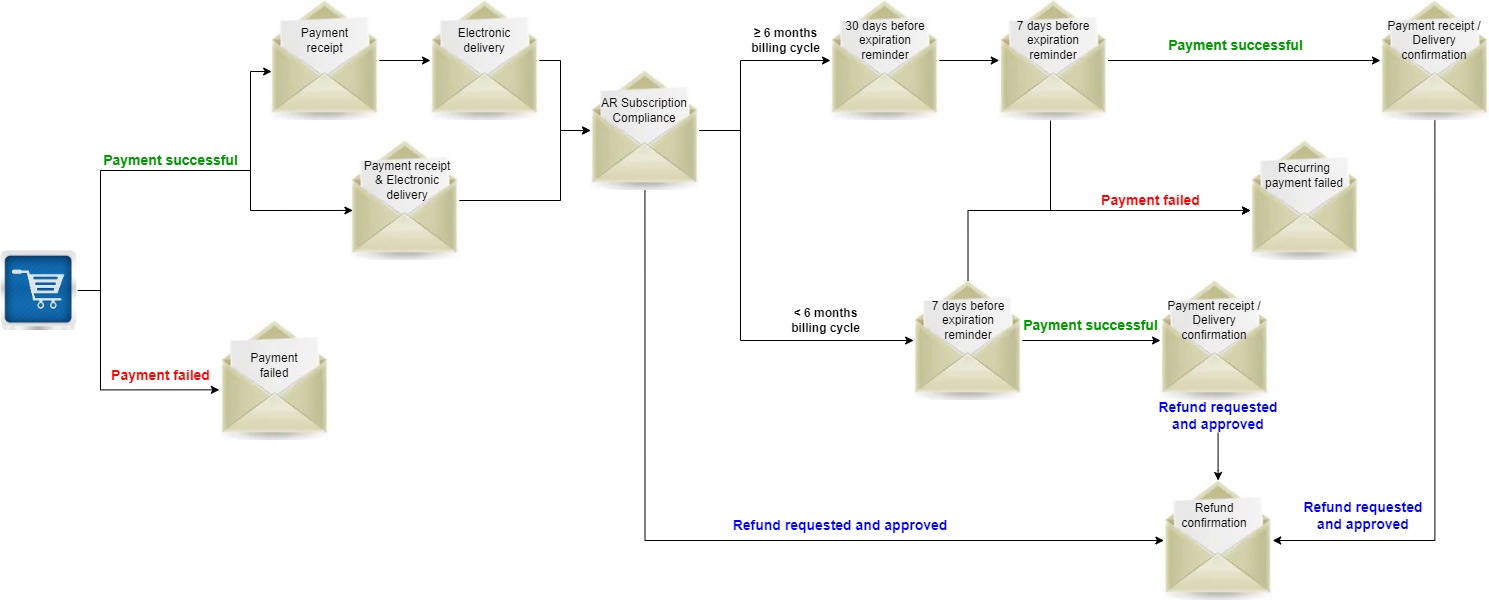
* Shopper purchases a subscription in the shopping cart.
* Once the payment is successful, a [Payment receipt](/marketing/emails/default-shopper-emails/payment-receipt.md) email is sent to the shopper with confirmation and details of their payment.
{% endstep %}
{% step %}
### Electronic delivery
* An [electronic delivery](/marketing/emails/default-shopper-emails/electronic-delivery-email.md) email is provided to the shopper including the subscription plan information, activation codes/keys with short descriptions, downloadable product files, technical and payment support contact details.
{% hint style="info" %}
2Checkout can send the electronic delivery email either standalone or combined with the payment receipt notification ([in one single email](/marketing/emails/default-shopper-emails/electronic-delivery-and-payment-receipt.md)).
{% endhint %}
{% endstep %}
{% step %}
### Auto-renewal compliance notification
* An [Auto Renewal subscription compliance](/marketing/emails/default-shopper-emails/compliance-subscription-email.md) email is sent automatically with confirmation and subscription details (billing cycle duration, next billing amount, next billing date, etc).
{% endstep %}
{% step %}
### Renewal reminders
* A [reminder](/marketing/emails/default-shopper-emails/renewal-notifications.md) email notification is sent before subscription expiration.
* **For billing cycles ≥ 6 months**:
* A **30 days before expiration reminder** email is sent, along with a 7 days before expiration reminder email.
* **For billing cycles < 6 months**:
* Only a **7 days before expiration reminder** email is sent.
{% hint style="info" %}
You can add other reminders should it make sense for your business, as the above illustrated examples are the mandatory ones, sent by default.
{% endhint %}
{% endstep %}
{% step %}
### On renewal day
* On the day of subscription expiration the auto-renewal subscription is activated which is confirmed when the shopper receives the [Payment receipt for renewal](/marketing/emails/default-shopper-emails/payment-receipt.md) email, along with the [Delivery confirmation](/marketing/emails/default-shopper-emails/electronic-delivery-email.md) email.
{% hint style="info" %}
This notification can be sent in:
* **One email**: (1) Payment receipt and Delivery / Fulfillment
* **Two emails**: (1) Payment receipt + (2) Delivery / Fulfillment
* **Three emails**: (1) Payment confirmation + (2) Payment Receipt + (3) Delivery / Fulfillment
{% endhint %}
{% endstep %}
{% endstepper %}
## Trial Flow
{% stepper %}
{% step %}
### Purchase and trial enrollment
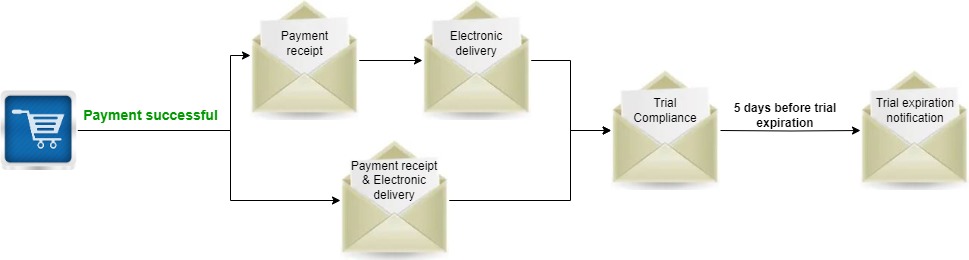
* Shopper purchases a subscription in the shopping cart and enrolls for a free or discounted trial.
* Once the payment is successful, a [Payment receipt](/marketing/emails/default-shopper-emails/payment-receipt.md) email is sent with confirmation and payment details.
{% endstep %}
{% step %}
### Electronic delivery for trial
* An [electronic delivery](/marketing/emails/default-shopper-emails/electronic-delivery-email.md) email is provided including subscription plan info, activation codes/keys, downloadable files, and support contact details.
{% hint style="info" %}
2Checkout can send the electronic delivery email either standalone or combined with the payment receipt notification ([in one single email](/marketing/emails/default-shopper-emails/electronic-delivery-and-payment-receipt.md)).
{% endhint %}
{% endstep %}
{% step %}
### Trial compliance and expiration notice
* A [compliance trial](/marketing/emails/default-shopper-emails/compliance-trial-email.md) email is sent automatically to shoppers with confirmation and details of their trial (period duration, trial expiration, following billing date and amount, and a link to [MyAccount](https://secure.2co.com/myaccount/) so the shopper can cancel the upcoming automatic charge).
* A **Trial expiration notification** email is sent to shoppers 5 days before their trial expiration date.
If the shopper continues with the subscription, follow the [Payment successful flow](#payment-successful-flow).
{% endstep %}
{% endstepper %}
## Payment failed / Refund flows
{% hint style="info" %}
Additional emails can be configured for unfinished payment and cart abandonment. For more information check the [Lead Management](/marketing/marketing/lead-management.md) documentation.
{% endhint %}
### Payment failed flow
{% stepper %}
{% step %}
#### Initial purchase attempt
* Shopper purchases a subscription in the shopping cart.
* The payment is processed.\
\
**Payment failed**
* If the payment fails, a **Payment failed** email is sent to the shopper, confirming the failed transaction and providing the possibility to return to the shopping cart and finalizing the purchase without having to go back through the ordering process.
**Payment successful**
* If the payment is successful, the [above flow](#payment-successful-flow) should be followed.
{% endstep %}
{% step %}
#### Renewal attempt after initial purchase
* On the next billing date the automatic renewal is attempted and payment is processed.\
\
**Payment failed**
* If the payment fails, a **Recurring payment failed** email is being sent to the shopper, confirming the failed transaction and providing the possibility to continue with the renewal by changing the payment method or manually renewing the subscription.
**Payment successful**
* If the payment is successful, the auto-renewal subscription is activated and a confirmation [Payment receipt for renewal](/marketing/emails/default-shopper-emails/payment-receipt.md) email is being sent to the shopper, along with the [Delivery confirmation](/marketing/emails/default-shopper-emails/electronic-delivery-email.md) email.
{% endstep %}
{% endstepper %}
### Refund flow
* A refund can be requested after the initial purchase once the payment is confirmed.
* If the **refund is requested and approved**, the shopper receives a [Refund Confirmation](/marketing/emails/email-variables/refund-approved.md) email.
* Refunds can occur after the first acquisition or at the last renewal.
---
# Agent Instructions
This documentation is published with GitBook. GitBook is the documentation platform designed so that both humans and AI agents can read, navigate, and reason over technical content effectively. Learn more at gitbook.com.
## Querying This Documentation
If you need additional information that is not directly available in this page, you can query the documentation dynamically by asking a question.
Perform an HTTP GET request on the current page URL with the `ask` query parameter, and the optional `goal` query parameter:
```
GET https://docs.2checkout.com/marketing/emails/subscription-email-flows.md?ask=&goal=
```
`ask` is the immediate question: it should be specific, self-contained, and written in natural language.
`goal` is optional and describes the broader end goal you are ultimately trying to accomplish on behalf of the user. GitBook uses it to tailor the answer towards what is most useful for that goal.
The response will contain a direct answer to the question and relevant excerpts and sources from the documentation.
Use this mechanism when the answer is not explicitly present in the current page, you need clarification or additional context, or you want to retrieve related documentation sections.