> For the complete documentation index, see [llms.txt](https://docs.2checkout.com/llms.txt). Markdown versions of documentation pages are available by appending `.md` to page URLs; this page is available as [Markdown](https://docs.2checkout.com/payment-link/checkout-links-and-options/checkout-advanced-options.md).
# Checkout advanced options
You can benefit from a whole list of advanced options when using the 2Checkout hosted checkout:
## Order language
Select the **AUTO** option for the order language to let 2Checkout select the checkout language depending on the customer's browser language preferences.
## Billing currency
Select the **AUTO** option for the billing currency to let 2Checkout select the billing currency depending on the customer's location.
## Compact shopping cart fields
Check to compact and minimize the number of mandatory cart fields shoppers need to fill in during the purchase process. Read more [here](https://verifone.cloud/docs/2checkout/Documentation/05Ordering/10Minimize_required_checkout_data/).
## Order template
Use either the default interface template assigned to your products for the checkout process or override the product group configuration and select a specific design.
## Your link source
The link source for the sales. Use the SRC parameter to track every sale point generator (e.g. homepage, product page, etc.)
## Redirect URL
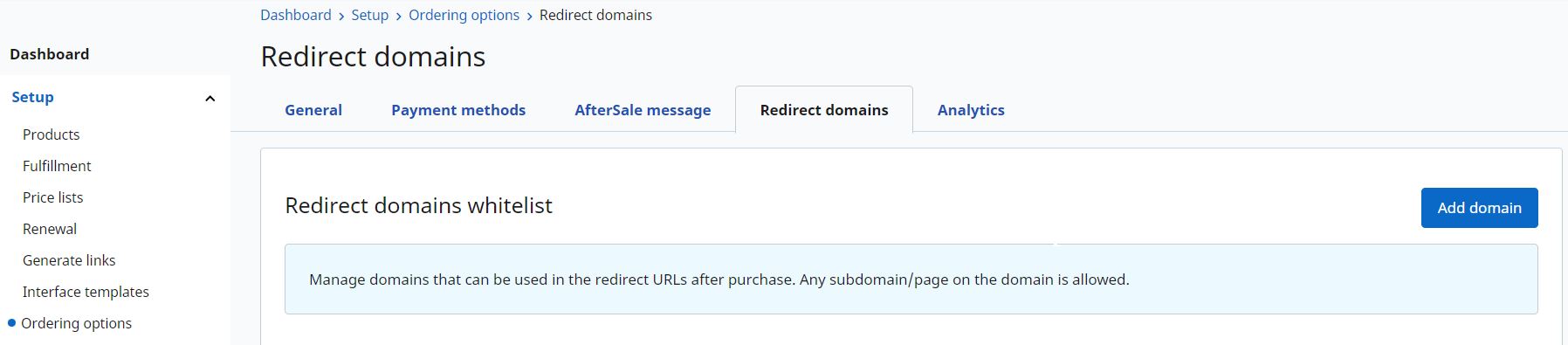
Shoppers will be redirected to this URL after the payment is confirmed. The Redirect URL replaces the default *Thank you* page. Only URLs set up on an approved redirect domain/subdomain can be used. If the URLs' domain/subdomain is not whitelisted the shopper will be redirected to the default *Thank you* page.
To manage domains that can be used in the redirect URLs after purchase go to Setup > **Ordering options** > **Redirect domains** > **Add domain**.
{% hint style="info" %}
**The domain validation will be available starting with 30th of July**. Until that date we will whitelist the needed domains based on historical data.
{% endhint %}
## Affiliate ID
Assign the order and associated commission for the sale to a specific affiliate.
## Payment method
Preselect the payment method for the order.
## Coupon code
Add a valid coupon code to the parameter COUPON= and the appropriate discount will be deducted from the product price and displayed in the shopping cart and/or checkout page.
## Additional information
E.g.: Free download, etc.
## Pre-check extra checkout options
Check the boxes below to automatically display the options as preselected in the shopping cart (by default, none of them is preselected).
* Auto-select Download Insurance option
* Auto-select cross-selling products
* Auto-select gift option
---
# Agent Instructions
This documentation is published with GitBook. GitBook is the documentation platform designed so that both humans and AI agents can read, navigate, and reason over technical content effectively. Learn more at gitbook.com.
## Querying This Documentation
If you need additional information that is not directly available in this page, you can query the documentation dynamically by asking a question.
Perform an HTTP GET request on the current page URL with the `ask` query parameter, and the optional `goal` query parameter:
```
GET https://docs.2checkout.com/payment-link/checkout-links-and-options/checkout-advanced-options.md?ask=&goal=
```
`ask` is the immediate question: it should be specific, self-contained, and written in natural language.
`goal` is optional and describes the broader end goal you are ultimately trying to accomplish on behalf of the user. GitBook uses it to tailor the answer towards what is most useful for that goal.
The response will contain a direct answer to the question and relevant excerpts and sources from the documentation.
Use this mechanism when the answer is not explicitly present in the current page, you need clarification or additional context, or you want to retrieve related documentation sections.