Minimize required checkout data
Overview
Use this feature to streamline the shopping cart by minimizing data entry and providing an optimized ordering experience for customers.
Availability
Available by default to 2Monetize accounts.
Requirements
This feature requires the use of the SHORT_FORM parameter in buy-links generated in the Merchant Control Panel.
The SHORT_FORM parameter is case sensitive.
Purchase flow support
This feature supports the following purchase flows:
Checkout with cart functionalities
One page checkout with review
One page checkout without review
Add to shopping cart
Checkout page
Product page
Express Payments Checkout
Trial links
Generate buy-links with the SHORT_FORM parameter
Log in to your 2Checkout Merchant Control Panel account.
Navigate to the Generate Links area.
Check the checkbox for the Compact shopping cart fields option when generating your buy-link to minimize the number of mandatory cart fields shoppers need to fill in during the purchase process. This action will automatically add the SHORT_FORM=1 parameter to the generated buy-links.
Create buy-links with the SHORT_FORM parameter manually
You can also add the SHORT_FORM=1 parameter manually to buy-links for shopping carts after you generate them.
When the feature is active for your account, and SHORT_FORM=1 is used in buy-links, the name, email, ZIP code, and country pair become the only required details of the billing address.
Using the SHORT_FORM=1 parameter without the feature being enabled for your account will result in shoppers following the classic purchase flow, where all billing address data is mandatory.
Workflow
Customers accessing buy-links that include the SHORT_FORM parameter after the feature has been enabled for your account will need to:
Fill in only the country and ZIP code (if it applies), necessary for VAT/tax calculation. The name, email, ZIP code, and the country are the only remaining address elements still mandatory.
Shoppers in the U.S., Puerto Rico, and Marshal Islands are required to provide a valid ZIP code for their location. The same requirement does not apply to shoppers worldwide.
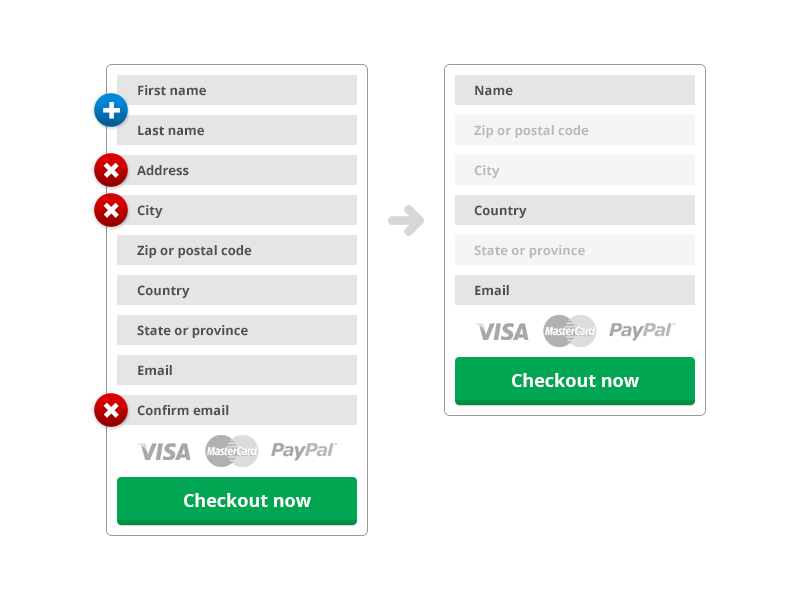
Not fill in the address information as the field is no longer mandatory. In fact, the address field doesn't need to be included in the cart design.
First name
Yes
Becomes part of the Name field
Last name
Yes
Becomes part of the Name field.
Address
No
-
City
Yes
Used for tax calculation. Shoppers from the U.S., Puerto Rico, Marshal Islands, Brazil, and Turkey are required to provide a valid city code for their location.
Zip or postal code
Yes*
Used for tax calculation. Shoppers from the U.S., Puerto Rico, Marshal Islands, and Brazil are required to provide a valid ZIP code for their location.
Country
Yes
Used for tax calculation.
State or province
Yes*
Used for tax calculation. Shoppers from the US, France, Romania, Brazil, Canada, India, and Turkey are required to provide their state or province during the checkout process.
Yes
-
Confirm email
No
-
VAT
Yes
Used for tax calculation. Shoppers from Turkey, India, and Serbia are required to provide a valid VAT id during the checkout process.
Company
Yes
Used for tax calculation. Shoppers from Turkey and India are required to provide a valid company id.

ZIP validation
2Checkout performs checks designed to ensure that the ZIP code provided by customers is valid.
Tax calculation
Taxes are calculated after a valid ZIP code is provided, and if necessary, added to the value of the products in the cart.
FAQs
Last updated
Was this helpful?