> For the complete documentation index, see [llms.txt](https://docs.2checkout.com/llms.txt). Markdown versions of documentation pages are available by appending `.md` to page URLs; this page is available as [Markdown](https://docs.2checkout.com/shopping-carts/inline/inline-checkout-with-signature-generation.md).
# InLine Checkout with signature generation
## Overview
Documentation for generating a [JSON Web Token (JWT)](https://jwt.io/introduction/) used to authenticate yourself when using the 2Checkout Signature Generation API endpoint can be found [here](https://verifone.cloud/docs/2checkout/Documentation/07Commerce/2Checkout-ConvertPlus/How-to-generate-a-JSON-Web-Token-JWT/).
## Generate a JWT for authenticating
It is strongly recommended you generate this using your own backend server and using a library to work with JSON Web Tokens (JWT).
In our examples below, we use the [lcobucci/jwt](https://github.com/lcobucci/jwt) PHP library to generate the JWT. You can use any library you want, but we strongly recommend using a library and not generating the JWT on your own.
### JWT generation example
You can see a simple example of generating the token here:
```php
issuedAt($time) // Configures the time that the token was issue (iat claim)
->expiresAt($time + 3600) // Configures the expiration time of the token (exp claim)
->withClaim('sub', config('demo.vendor_code')) // Configures a new claim, called "sub" ( default subject of the JWT )
->getToken(new Sha512(), new Key(config('demo.vendor_secret'))); // Retrieves the generated token
return (string)$token;
}
}
```
This method returns a token which expires 60 minutes (3600 seconds) after it is generated. In most cases, this should allow you enough time, but you can modify this threshold as per your needs.
Using the library, call the new Lcobucci\JWT\Builder() and set the parameters specified in the [How-to-generate-a-JWT documentation](https://verifone.cloud/docs/2checkout/Documentation/07Commerce/2Checkout-ConvertPlus/How-to-generate-a-JSON-Web-Token-JWT/).
In order to use the JWT to authenticate in the 2Checkout Signature Generation API Endpoint, the algorithm used must be HS512, so you need to call the method getToken with the parameters new Sha512() for the algorithm and new Key('VENDOR\_SECRET') for the JWT secret signature.
{% hint style="warning" %}
For new Key('VENDOR\_SECRET') you need to use your **Buy-link Secret Word**, which can be found in your Merchant Control Panel under *Integrations* → *Webhooks & API* → [*Secret Word*](https://secure.2checkout.com/cpanel/webhooks_api.php) section.
{% endhint %}
## Use cases
All scenarios below use the /encrypt/generate/signature Convert Plus endpoint to generate a valid signature. This endpoint is further documented [here](https://verifone.cloud/docs/2checkout/Documentation/07Commerce/2Checkout-ConvertPlus/How-to-use-2Checkout-Signature-Generation-API-Endpoint/) and the format of the accepted parameters [here](/shopping-carts/inline/inline-checkout-methods-and-parameters.md).
{% stepper %}
{% step %}
### Static cart with a signature generated before the page is rendered
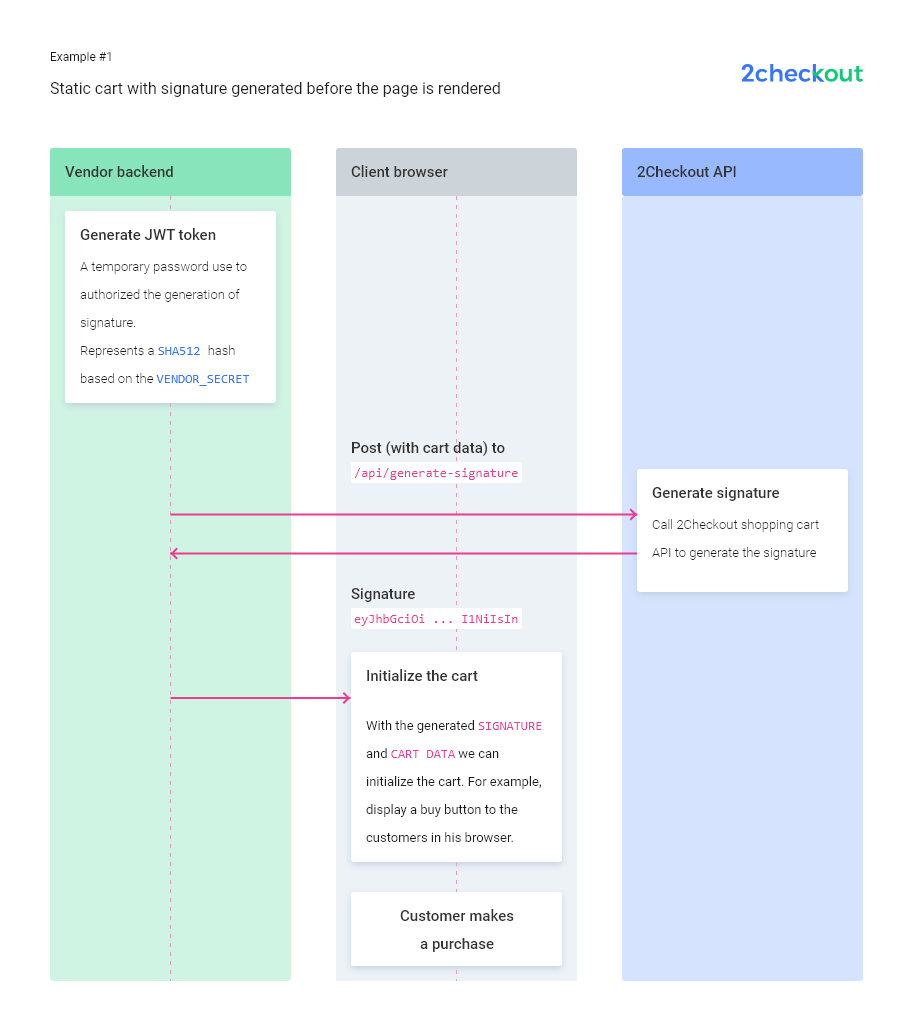
This example showcases a simple HTML page that loads a pre-defined cart and its products. The signature is retrieved before the page is rendered and returned as a response to the client.
```php
public function example1(){
$jwtToken = JwtToken::getToken();
$signature = CartSignature::getSignatureStaticCart($jwtToken);
return view('example-1')->with('signature', $signature);
}
```
The signature is generated as described [here](https://verifone.cloud/docs/2checkout/Documentation/07Commerce/2Checkout-ConvertPlus/How-to-use-2Checkout-Signature-Generation-API-Endpoint/).
The body of the function getSignatureStaticCart looks like this:
```php
public static function getSignatureStaticCart(string $jwtToken)
{
$curl = curl_init();
$products = config('examples.1.products');
$payload = new \stdClass;
$payload->merchant = config('demo.vendor_code');
$payload->lock = 1;
$payload->products = $products;
$payload->currency = 'USD';
curl_setopt_array($curl, [\
CURLOPT_URL => https://secure.2checkout.com/checkout/api/encrypt/generate/signature,\
CURLOPT_RETURNTRANSFER => true,\
CURLOPT_CUSTOMREQUEST => 'POST',\
CURLOPT_POSTFIELDS => json_encode($payload),\
CURLOPT_HTTPHEADER => [\
'content-type: application/json',\
'merchant-token: ' . $jwtToken,\
],\
]);
$response = curl_exec($curl);
$err = curl_error($curl);
curl_close($curl);
if ($err) {
throw new \Error('Curl error: ' . $err);
}
$signature = self::parse($response);
return $signature;
}
```
The relevant contents of the HTML page generated will be:
```html
function buy() {
TwoCoInlineCart.cart.setCurrency('USD');
TwoCoInlineCart.products.removeAll();
TwoCoInlineCart.products.addMany(
{!! json_encode(config('examples.1.products')) !!}
);
TwoCoInlineCart.cart.setCartLockedFlag(true);
TwoCoInlineCart.cart.setSignature('{{$signature}}');
TwoCoInlineCart.cart.checkout();
}
```
The call to the TwoCoInlineCart checkout happens after setting the cart with exactly the same parameters used for the signature AND setting the signature (TwoCoInlineCart.cart.setSignature) to the one previously generated.
{% endstep %}
{% step %}
### Dynamic cart with products selected by Customer - signature generated only once
This example showcases how you can have a dynamic cart, so the customer can select products and quantities. Because the products are added/changed by the customer inside the page, the signature must be generated when the shopping cart loads, using the products the customer selected; otherwise, the signature would be invalid and the cart would not load.
Clicking the buy-link would not immediately open the cart. Firstly, you must send the current cart payload to your backend and get the signature for the cart.
```html
async function getSignature(){
const response = await fetch('/api/generate-signature', {
method: 'POST',
headers: {
'Content-Type': 'application/json'
},
redirect: 'follow',
referrerPolicy: 'no-referrer',
body: JSON.stringify({
cart: {
products: cart.products
}
})
});
return response.json();
}
```
The backend receives the products and makes the call to get the signature for this payload, then returns the signature.
```php
public function generateSignature(Request $request){
$requestProducts = $request->input('cart.products');
$jwtToken = JwtToken::getToken();
$signature = CartSignature::getSignatureForProducts($jwtToken, $requestProducts);
return json_encode($signature);
}
```
Then, you can set the signature returned by your backend and initialize the cart. This is the JavaScript snippet that does this.
```html
async function buy() {
console.log('getting signature...');
let signature = await getSignature();
console.log('signature retrieved, ', signature);
TwoCoInlineCart.cart.setCurrency('USD');
TwoCoInlineCart.products.removeAll();
TwoCoInlineCart.products.addMany(
cart.products
);
TwoCoInlineCart.cart.setCartLockedFlag(true);
TwoCoInlineCart.cart.setSignature(signature);
TwoCoInlineCart.cart.checkout();
}
```
{% endstep %}
{% step %}
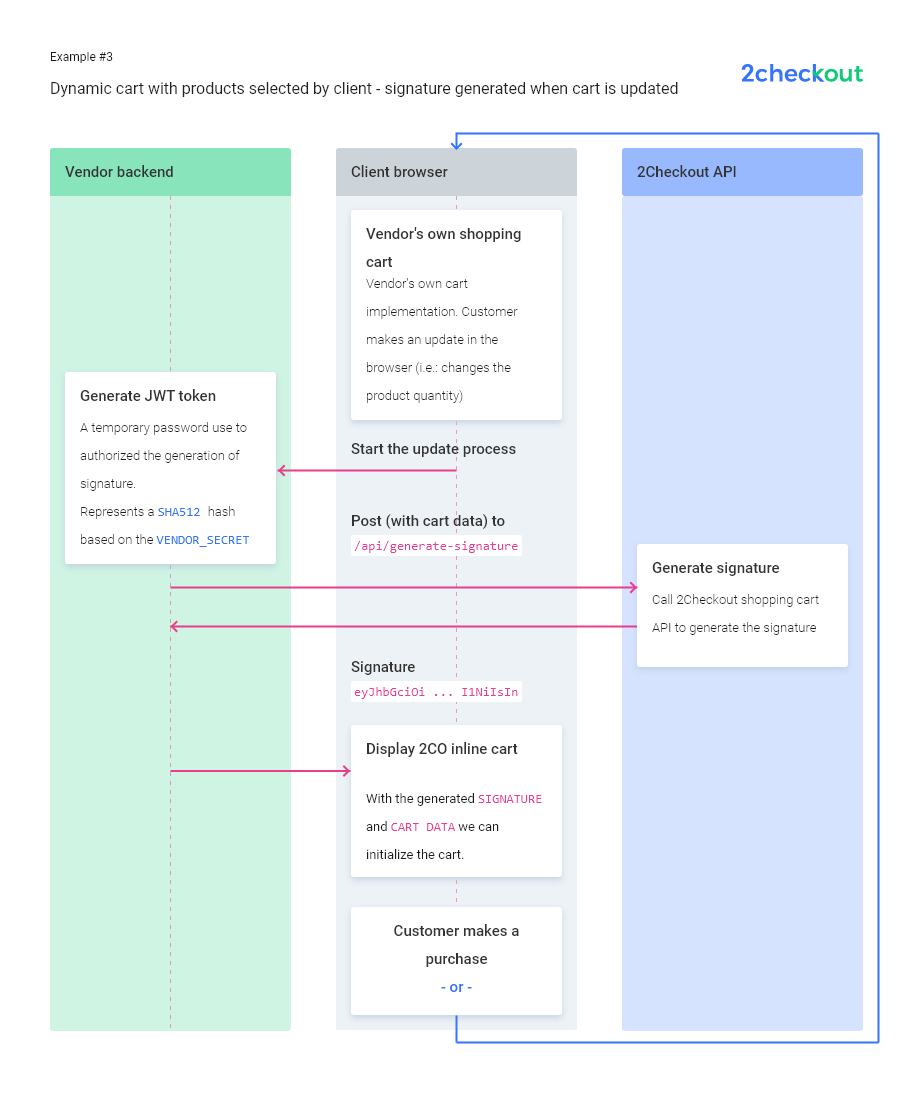
### Dynamic cart with products selected by customer - signature generated when the cart is updated
For the second use case above, the customer will have to wait for the generateSignature call when the buy button is pressed.
An alternative would be to generate and set a new signature every time the cart is updated. This way, more calls will be made to both your backend and the 2Checkout Signature Generation Endpoint, but the cart will load faster.
```html
async function updateCart() {
computeCart();
await setSignature();
updateView();
}
```
While computeCart will update the payload, the setSignature call will make an Ajax to your backend, the same as in the second use case, and call TwoCoInlineCart.cart.setSignature(signature);.
```html
async function setSignature() {
console.log('getting signature...');
let signature = await getSignature();
console.log('signature retrieved, ', signature);
TwoCoInlineCart.cart.setSignature(signature);
}
```
When clicking the Buy button, the cart will boot faster, as the signature call will already be called when the last cart modification is done.
You can choose between use cases 2 & 3, depending on your application's needs and objectives.
{% endstep %}
{% step %}
### Cart with custom prices Products
If you have products with custom prices, you should always calculate the price of the product in your own backend. If you have frontend logic that generates and computes calculations in order to display the total, those prices should be used for only that, frontend display.
You must recompute the price on your backend and generate a signature with a payload that only you can validate: do not allow an AJAX call to your backend to calculate the total price.
```php
public function signatureCustomPrices(Request $request){
$requestProducts = $request->input('cart.products');
// set custom prices
// !! do not trust prices coming on the request
// use the custom prices set in our system ( in this case they can be found in the @var $productsData )
$productsWithCustomPrices = [];
foreach($requestProducts as $key => $requestProduct){
$requestProductCustomPrice = $this->getCustomPriceByProductCode($requestProduct['code']);
$productsWithCustomPrices[$key]['code'] = $requestProduct['code'];
$productsWithCustomPrices[$key]['quantity'] = $requestProduct['quantity'];
$productsWithCustomPrices[$key]['custom-price'] = $this->formatCustomPrice($requestProductCustomPrice, $requestProduct['quantity']);
}
// create the payload with the product codes and quantities set by shopper, BUT the prices from the backend
$cartPayload = new \stdClass;
$cartPayload->merchant = config('demo.vendor_code');
$cartPayload->products = $productsWithCustomPrices;
$cartPayload->currency = 'USD';
// get JWT using token
$jwtToken = JwtToken::getToken();
// generate signature
$signature = CartSignature::getSignatureForTheEntirePayload($jwtToken, $cartPayload);
return json_encode($signature);
}
```
Depending on your own case, you can use the second or third scenarios to set the signature.
{% endstep %}
{% step %}
### Cart with dynamic products
In order to generate a signature for dynamic products, the payload you send to the 2Checkout API Generation Endpoint should have the same parameters as the ones you use to set up the cart in your JavaScript code.
```javascript
$cartPayload = new \stdClass;
$cartPayload->merchant = config('demo.vendor_code');
$cartPayload->currency = 'USD';
$cartPayload->dynamic = '1';
$cartPayload->products = config('examples.5.products');
$jwtToken = JwtToken::getToken();
$signature = CartSignature::getSignatureForTheEntirePayload($jwtToken, $cartPayload);
function buy() {
TwoCoInlineCart.setup.setMode('DYNAMIC');
TwoCoInlineCart.cart.setCurrency('USD');
TwoCoInlineCart.products.removeAll();
TwoCoInlineCart.products.addMany(
{!! json_encode(config('examples.5.products')) !!}
);
TwoCoInlineCart.cart.setSignature('{{$signature}}');
TwoCoInlineCart.cart.checkout();
}
```
Notice that you must set the payload currency and dynamic, the same way as you do in the JavaScript code.
After you compute this payload, you can just call the signature generation API endpoint.
```javascript
public static function getSignatureForTheEntirePayload(string $jwtToken, \stdClass $cartPayload)
{
$curl = curl_init();
curl_setopt_array($curl, [\
CURLOPT_URL => config('demo.signature_api_url'),\
CURLOPT_RETURNTRANSFER => true,\
CURLOPT_CUSTOMREQUEST => 'POST',\
CURLOPT_POSTFIELDS => json_encode($cartPayload),\
CURLOPT_HTTPHEADER => [\
'content-type: application/json',\
'merchant-token: ' . $jwtToken,\
],\
]);
$response = curl_exec($curl);
$err = curl_error($curl);
curl_close($curl);
if ($err) {
throw new \Error('Curl error: ' . $err);
}
$signature = self::parse($response);
return $signature;
}
```
{% endstep %}
{% endstepper %}
---
# Agent Instructions
This documentation is published with GitBook. GitBook is the documentation platform designed so that both humans and AI agents can read, navigate, and reason over technical content effectively. Learn more at gitbook.com.
## Querying This Documentation
If you need additional information that is not directly available in this page, you can query the documentation dynamically by asking a question.
Perform an HTTP GET request on the current page URL with the `ask` query parameter, and the optional `goal` query parameter:
```
GET https://docs.2checkout.com/shopping-carts/inline/inline-checkout-with-signature-generation.md?ask=&goal=
```
`ask` is the immediate question: it should be specific, self-contained, and written in natural language.
`goal` is optional and describes the broader end goal you are ultimately trying to accomplish on behalf of the user. GitBook uses it to tailor the answer towards what is most useful for that goal.
The response will contain a direct answer to the question and relevant excerpts and sources from the documentation.
Use this mechanism when the answer is not explicitly present in the current page, you need clarification or additional context, or you want to retrieve related documentation sections.