> For the complete documentation index, see [llms.txt](https://docs.2checkout.com/llms.txt). Markdown versions of documentation pages are available by appending `.md` to page URLs; this page is available as [Markdown](https://docs.2checkout.com/shopping-carts/inline/signature-validation-for-return-url-via-inline-checkout.md).
# Signature validation for return URL via InLine checkout
## Overview
To start, you need to generate the InLine checkout content using the TwoCoInlineCart client.
At this step, you must add a product to your cart, set the return method, and set a previously generated cart payload signature.
```javascript
TwoCoInlineCart.cart.setCurrency('USD');
TwoCoInlineCart.products.add({
code : 'TEST_PROD',
quantity: 1,
price : 29
});
TwoCoInlineCart.cart.setReturnMethod({
type: 'redirect',
url : 'https:\/\/yourbackend.com\/'
});
TwoCoInlineCart.cart.setSignature('314cfb1f277ef89f9f3735517...........1c62abee466c9d1774bf1e4655f0');
```
After triggering TwoCoInlineCart.cart.checkout(); the InLine checkout will initialize in the new iframe.
In case of a valid signature, the cart will boot and the shopper can complete the order. Otherwise, he will see an empty cart page.
In case of a valid signature and successful order placing, the shopper is redirected to the page you have defined in the return parameters. The return URL is appended with some return parameters which are refno, total, total-currency, all of them are signed and their signature should be present in the query parameters.
In the backend, you need to gather all these parameters and validate the parameters' hash you generate with the new signature appended to the return-URL.
To generate the hash and validate the return URL, follow the steps below.
## Build the InLine Checkout Signature
To sign an InLine checkout buy-link, you need to follow these steps:
1. Sort the parameters that require a signature alphabetically.
2. Serialize the parameters and append to them the length of their values.
3. Concatenate the resulting values.
4. The serialized value is then encrypted with your Buy-Link [Secret Word](https://docs.2checkout.com/get-started-with-the-2checkout-api/) using the HMAC method (algorithm sha256).
5. The resulting value is added to the buy-link under the **signature** parameter.
In order to generate a valid InLine checkout signature, you should include all the parameters from the return URL, except the signature.
### Example
{% hint style="info" %}
When encrypting the values to generate the signature, for the return-url parameter, use an URL with the following structure: https\://..... Do not use an encoded URL.
{% endhint %}
Let's consider the following parameters:
* `refno` = 11606896
* `total` = 29
* `total-currency` = USD
The regular return link will have the following structure:
```
https://www.yourbackend.com/?refno=11606896&total=29&total-currency=USD&signature=08448c91bbb314cfb1f277ef89f9f37355171c62abee466c9d1774bf1e4655f0
```
Steps applied to these parameters:
1. Sort the parameters alphabetically: `refno`, `total`, `total-currency`.
2. Serialize the values by prefixing each value with its length (number of characters):
* `refno` → `811606896`
* `total` → `229`
* `total-currency` → `3USD`
3. Concatenate the serialized values: `118116068962293USD`
4. Encrypt using your Secret Word
* Algorithm: `sha256`
* Key: merchant secret word (example: `vendor-secret-key`)
This outputs a 64-character hexadecimal string:
```
08448c91bbb314cfb1f277ef89f9f37355171c62abee466c9d1774bf1e4655f0
```
You can also use the following PHP HashValidationTool to validate a return URL signature.
```php
key = $key;
}
/**
* @return string
*/
private function encrypt(): string
{
$serialized = $this->serializeParameters($this->params);
if (strlen($serialized) > 0) {
echo 'Success: serialized params - ' . $serialized . PHP_EOL;
return bin2hex(hash_hmac(self::SHA_256, $serialized, $this->key, true));
} else {
echo 'Error: serialization parameters are empty' . PHP_EOL;
return '';
}
}
/**
* @param string $url
*
* @return bool
*/
public function validate(string $url): bool
{
$this->setUrl($url);
return $this->encrypt() === $this->signature;
}
/**
* @param array $array
*
* @return string
*/
private function serializeParameters(array $array): string
{
ksort($array);
$serializedString = '';
foreach ($array as $value) {
if (is_array($value)) {
$serializedString .= $this->serializeParameters($value);
} else {
$serializedString .= strlen($value) . $value;
}
}
return $serializedString;
}
/**
* @param string $url
*/
private function setUrl(string $url): void
{
$urlParts = parse_url($url);
parse_str($urlParts['query'], $this->params);
$this->signature = $this->params['signature'];
unset($this->params['signature']);
}
}
$hashValidationTool = new HashValidationTool('vendor-secret-key');
if ($hashValidationTool->validate('https://www.yourbackend.com/?merchant=YOUR_VENDOR_CODE¤cy=USD&return-url=https://yourbackend.com/&return-type=redirect&tpl=default&prod=TEST_PROD&price=29&qty=1&refno=11606896&total=29&total-currency=USD&signature=95052ee0c558b53040e97d7d81add2e0f1400ca0936a558910c68ddc8301fc63')) {
echo 'valid';
} else {
echo 'invalid';
}
```
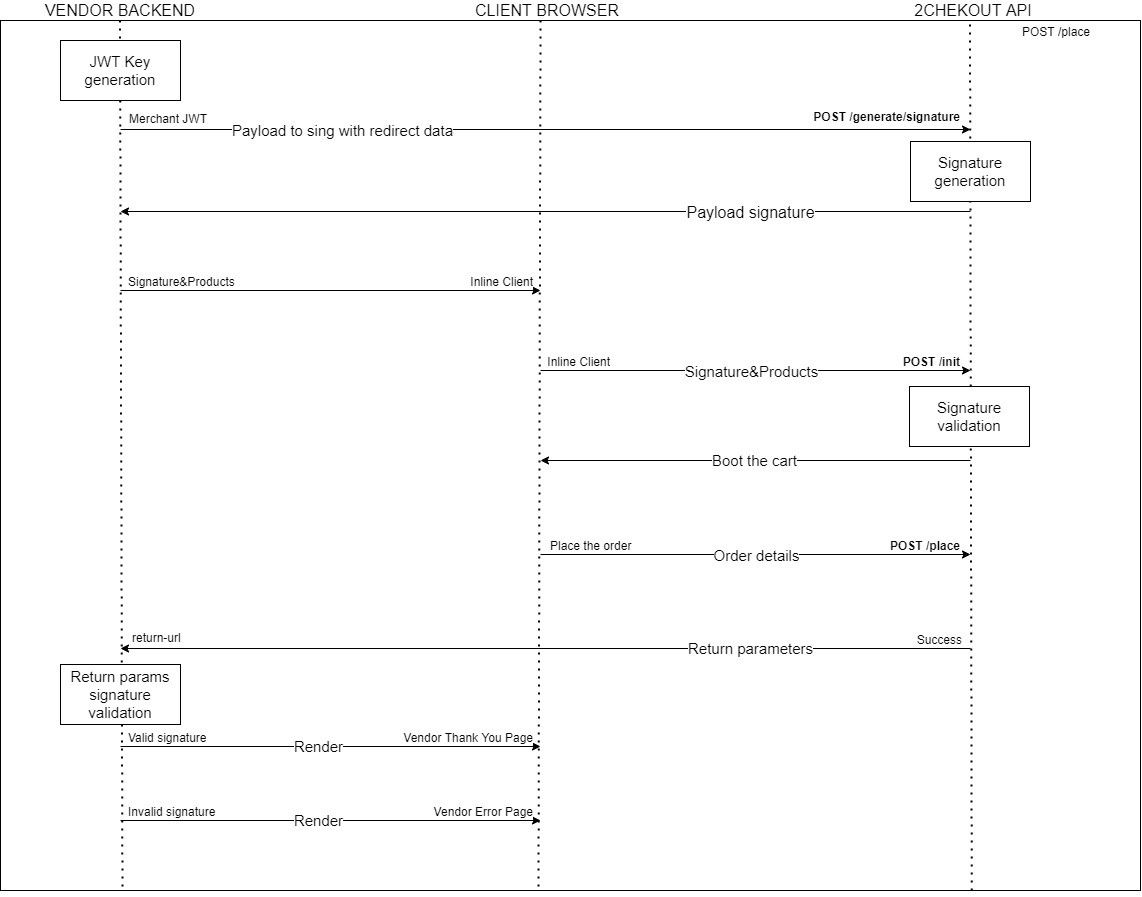
## Diagram
The successful order placement flow with a valid signature for the InLine checkout is described in the following diagram.
---
# Agent Instructions
This documentation is published with GitBook. GitBook is the documentation platform designed so that both humans and AI agents can read, navigate, and reason over technical content effectively. Learn more at gitbook.com.
## Querying This Documentation
If you need additional information that is not directly available in this page, you can query the documentation dynamically by asking a question.
Perform an HTTP GET request on the current page URL with the `ask` query parameter, and the optional `goal` query parameter:
```
GET https://docs.2checkout.com/shopping-carts/inline/signature-validation-for-return-url-via-inline-checkout.md?ask=&goal=
```
`ask` is the immediate question: it should be specific, self-contained, and written in natural language.
`goal` is optional and describes the broader end goal you are ultimately trying to accomplish on behalf of the user. GitBook uses it to tailor the answer towards what is most useful for that goal.
The response will contain a direct answer to the question and relevant excerpts and sources from the documentation.
Use this mechanism when the answer is not explicitly present in the current page, you need clarification or additional context, or you want to retrieve related documentation sections.